I had no idea my Mac had a free offline AI built in
Your Mac has a free offline AI built in. Here's how to open it, what it's good for when you travel, and where it lets you down.
You're on a plane, the Wi-Fi is either missing or overpriced, and the AI you lean on all day is a spinning wheel. Claude, ChatGPT, and every other AI app you use need a connection to do anything.
I pay for Claude every month, and yet the one AI that works on a plane came free with my MacBook. It's an offline AI that runs entirely on the Mac. It arrived quietly with the macOS 27 update, without an app or an icon, and I'd been carrying it around for weeks without knowing.
A fair warning before you go looking: this isn't another chat app with a polished window you open from the Dock. Apple put it in Terminal, the plain text window most people only open by accident, and you talk to it by typing. It's less scary than it sounds.
How to open the offline AI on your Mac
Open Terminal, type fm chat, and you're talking to Apple's own model, answering from your Mac. There's no account to sign in to, either. (fm is short for Foundation Models, Apple's name for the models behind Apple Intelligence.)
fm chat works like any chat app: you type, it answers, and it remembers the conversation. Most of the time, though, you don't need a conversation. You've copied a long email or a page from a doc, and you just want the gist. That's what fm respond is for. You give it one job, it does it, and you're back where you started.
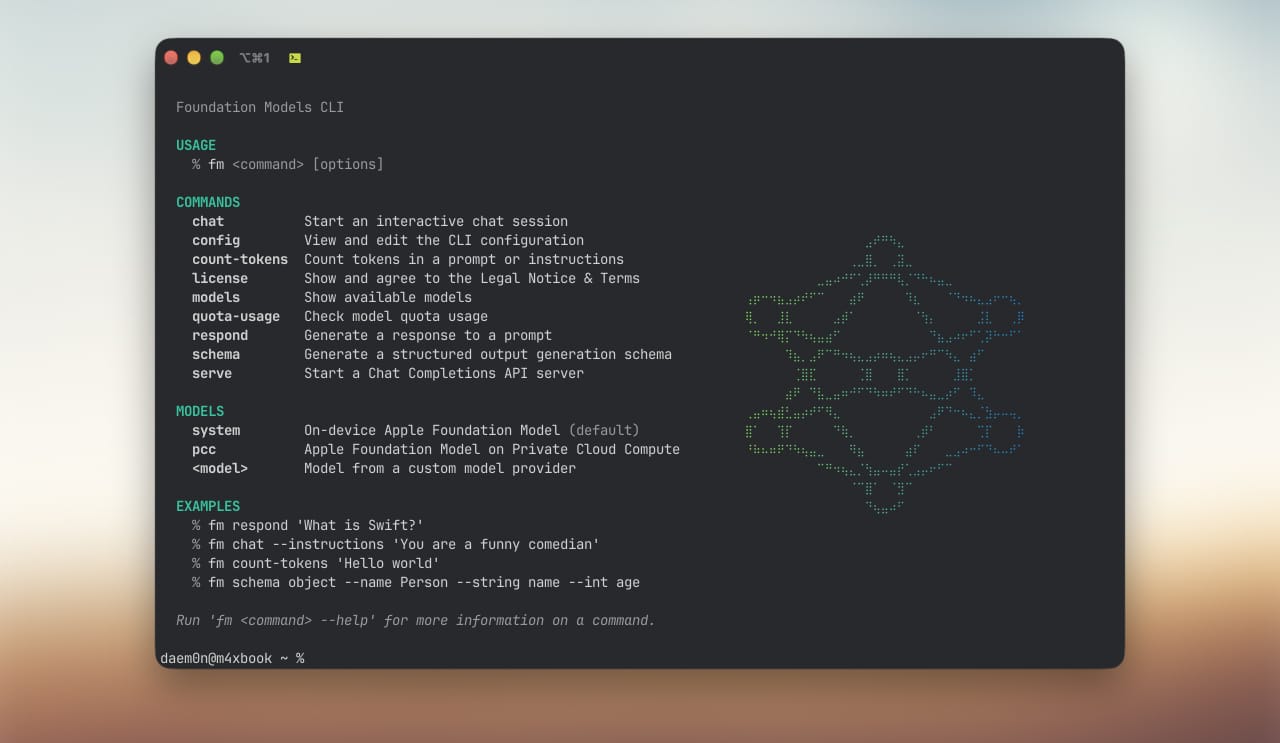
Here's the one I'd start with. Copy any text, then run:
fm respond -i "Summarize in three bullets" "$(pbpaste)"
The part after -i is your instruction, so swap it for whatever you need, like "make this friendlier" or "turn this into a to-do list". $(pbpaste) is Terminal's way of saying "whatever's on my clipboard".
Which model you get depends on your Mac. Apple keeps the larger of its two on-device models for newer chips, and older Macs get a smaller one. Mine is an M4 Max, so treat what follows as the better end of the range.
There's also a bigger model that runs on Apple's servers, and fm can use that one too. It needs the internet like everything else, though, so on a plane you get the one on your Mac. Everything below is that one.
Run
fm chat once at home first. You may be asked to accept Apple's terms the first time, and that's better done on your own Wi-Fi than at the gate. Then switch on airplane mode and try it, so you know what you've got before you need it.What offline AI is good for when you travel
It does its best work on words you hand it.
I gave it a page of messy, half-sentence design notes, the kind I write in the middle of a project, and asked for a list of open questions and decisions. A few seconds later, the question marks had become proper questions. It also turned the one decision on the page into a question, so I'd still read the list before sending it to anyone.
Replies went better. I pasted in a message asking to move a meeting to Thursday and asked for a short, friendly yes. It came back in about a second, the kind of reply you'd write on the plane and send when you land.
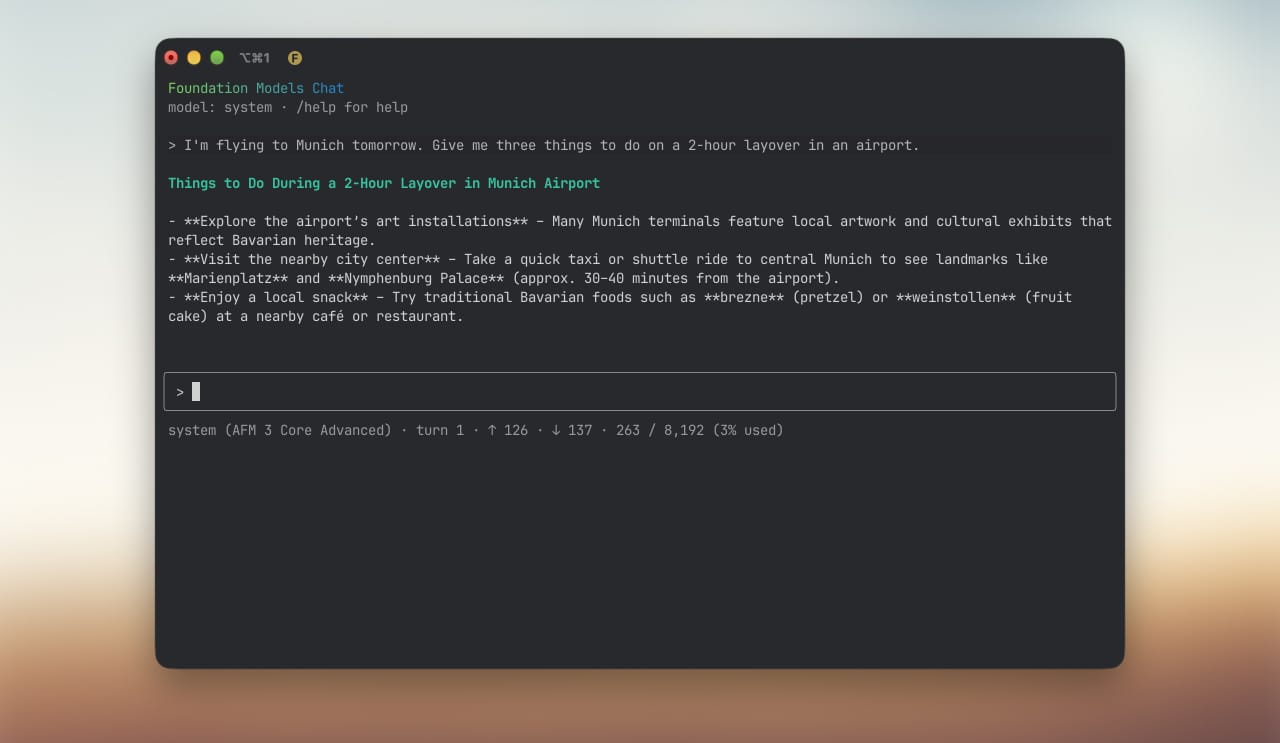
It reads, too. I gave it my last article and asked for a three-bullet summary. Four seconds later I had three bullets that got the article right, give or take a detail. So save that long read before you board, and you can get the gist of it in the air.
Just not anything too long. The model holds about 8,000 tokens at a time, shared between what you give it and what it writes back. Three of my articles fit at once. A fourth, and it stopped with an error. Older Macs get about half that.
Where it lets you down
Ask it about the world, and it wobbles.
I asked it what a Ghost theme is. Ghost is the platform this blog runs on, and I've been building themes for it for years. According to my Mac, a Ghost theme "involves elements like transparency, ethereal lighting, and spectral imagery to create a haunting or mysterious atmosphere." For the record, it's mostly Handlebars and CSS 😅
Names get the same treatment. I asked it to name a screenshot of Quidough, the finance app I'm building, and it called the file qualdough-accounts. It's a small model, so when it meets a name it hasn't seen before, it swaps in something that looks close. Expect it to stumble on anything with a name, like a client's company or the street your hotel is on.
I wanted to see how it'd cope with something you'd actually run into abroad, so I gave it a few dishes from a Bavarian menu and asked it to translate them and flag anything with pork. It didn't translate any of them. It flagged the Schweinshaxe, which is pork knuckle, and missed the Leberkäse, which is pork too.
If you don't eat pork, that's not a small slip. For anything you're about to eat or sign, wait for a connection or ask someone.
Why I'd never heard of it
Apple didn't announce it on stage at WWDC. It only came up in a developer session about scripting with the model, and nothing on your Mac points you to it. Unless someone tells you the two letters, you'd never know it's there.
Which is a shame, because it's well suited to small jobs like the one I wrote about a while back: renaming my screenshots with AI the moment they land. This model can do that from Terminal, for free, even at 30,000 feet, as long as I check the names it picks. It's worse than ChatGPT at plenty of things, but I still think it's earned a place.
Has it earned one in your day? Reply and tell me which small, boring job you'd hand it first.